


How AI Models Are Trained: A Beginner's Guide
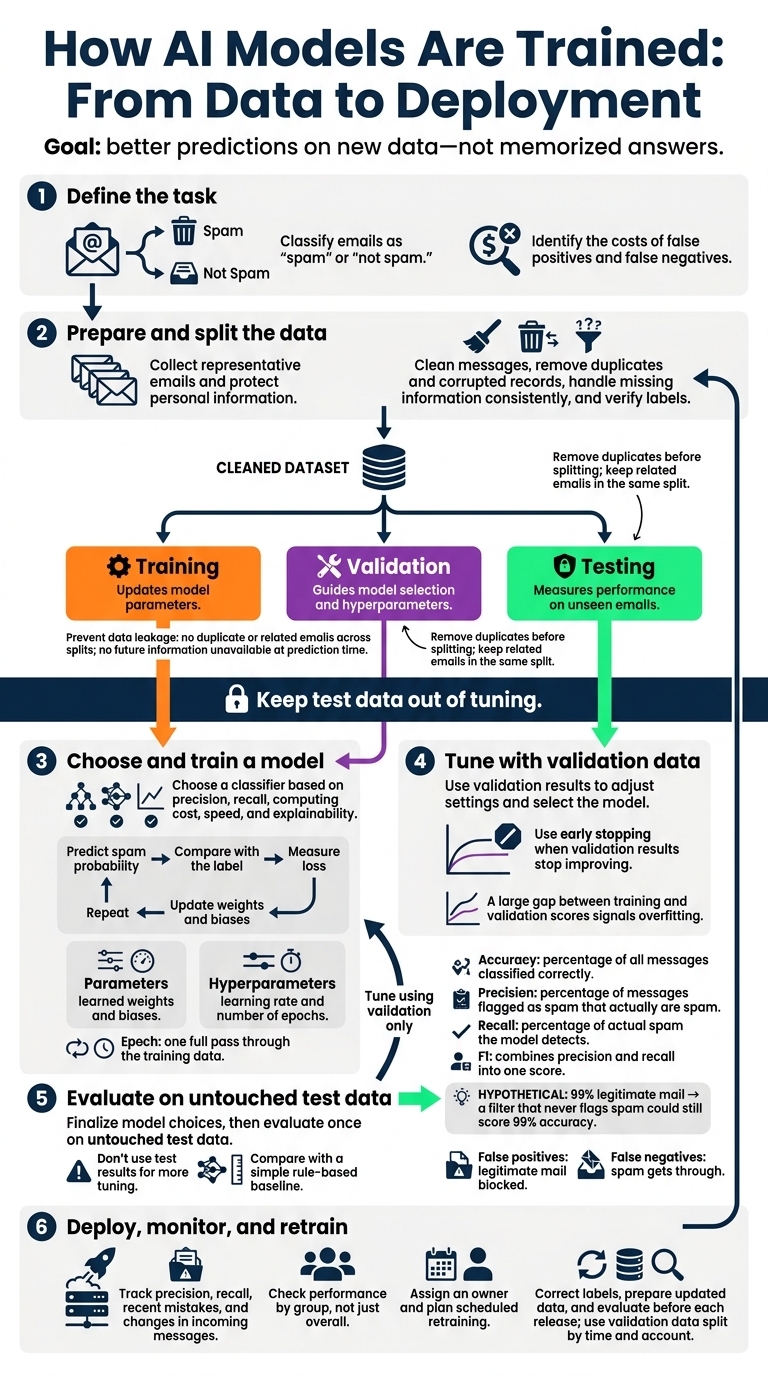
When we at iDelsoft train an AI model, the goal is better predictions on new data, not memorized answers. For a spam filter, we start with labeled emails and keep training, validation, and test data separate.
Here’s the process we follow:
Our rule: keep test data out of tuning. That helps us check whether the model can handle emails it hasn’t seen before.
Here’s the process we follow:
- Prepare the data: Clean messages, check labels, protect personal information, and prevent overlap between datasets.
- Train and tune: Choose a model, let it learn from prediction errors, and use validation results to adjust training settings.
- Check results: Measure precision, recall, and F1, not just accuracy. In a hypothetical inbox with 99% legitimate mail, a filter that never flags spam could still score 99% accuracy.
- Maintain the model: Watch for mistakes across groups and changes in incoming mail, then retrain and test before each release.
Our rule: keep test data out of tuning. That helps us check whether the model can handle emails it hasn’t seen before.
Collect and Prepare Training Data
Collect, Clean, and Label Messages
Collect emails that reflect actual inbox traffic, including both spam and not spam. Protect personal information, and sample the types of messages users receive.
Remove duplicates and corrupted records, handle missing information consistently, and put formats into a consistent form. Label each email as spam or not spam using clear rules. Review disagreements and resolve unclear cases so the model has reliable examples to learn from.
Then split the cleaned, labeled emails into training, validation, and testing sets.
Split Data for Training, Validation, and Testing
Each dataset has a different job:
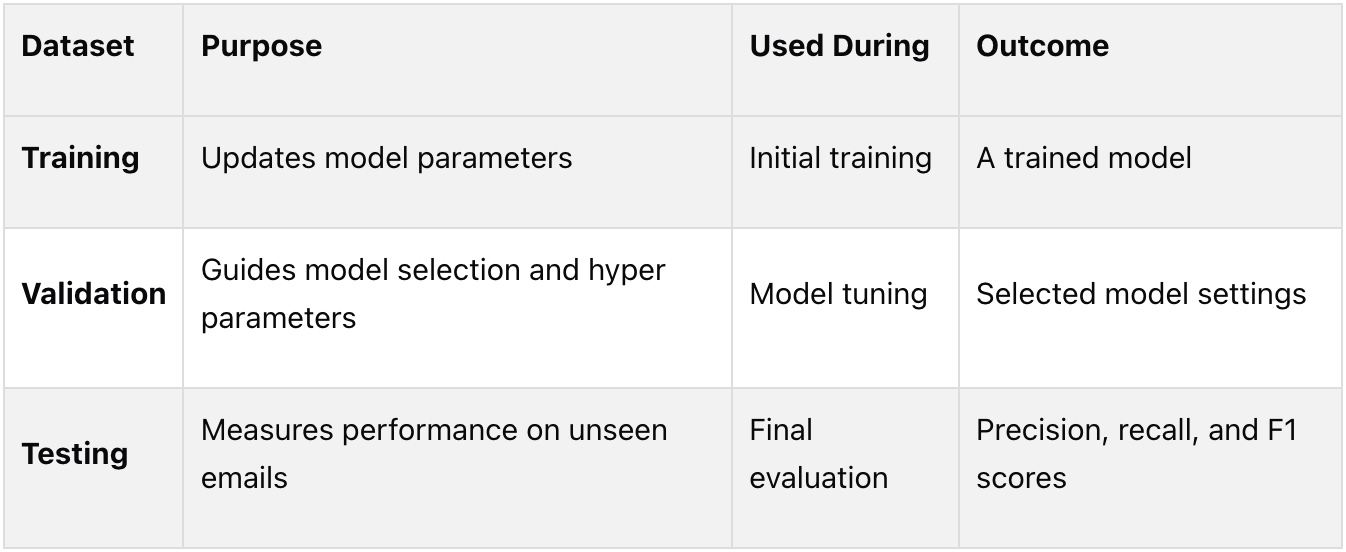
Remove duplicates before splitting, and keep related emails in the same split. This prevents data leakage and keeps test emails separate from the data used to train and tune the model.
Next, choose a model and train it on the training set.
Choose and Train a Model
Once your data is clean and split, choose a model and train it on the training set.
Spam detection is classification: assigning a message to “spam” or “not spam.” A classifier can also produce a spam score.
Your choice depends on the data, required precision and recall, computing cost, speed, and how easy the scores are to explain. A spam score should express likelihood - not certainty. Calibration checks whether those scores match actual outcomes.
With the model selected, training starts with a prediction.
Predict, Measure Error, and Update Parameters
During training, the model receives a message and predicts its spam probability. It compares that prediction with the message’s label and measures the error using loss.
An optimization method then adjusts the model’s learned settings: weights and biases. This process repeats across the training set.
Hyperparameters control how fast the model learns and how long training runs.
Parameters vs. Hyperparameters
Parameters are the weights and biases the model learns during training. Hyperparameters are settings people choose to guide that training, such as the learning rate and number of epochs - full passes through the training data.
The learning rate controls the size of each adjustment. Set it too high, and training can overshoot good settings. Set it too low, and learning can be slow.
Too few passes can leave patterns unlearned. Too many can lead to overfitting: learning details from the training data that don’t help with new messages. Use early stopping when validation results stop improving.
How to train AI ML models? Full pipeline in 15 mins.
Evaluate the Model on Unseen Messages
After training, test how well the model handles messages it has never seen. Training scores show how well it fits familiar data - not how it will perform in actual use. Use validation data to finalize model choices, then evaluate once on untouched test data. Don’t use those test results for more tuning. Compare the model with a simple rule-based baseline, too.
Measure Accuracy, Precision, Recall, and F1
Choose metrics based on the cost of mistakes. False positives block legitimate mail. False negatives let spam through. Accuracy alone doesn’t show that tradeoff.
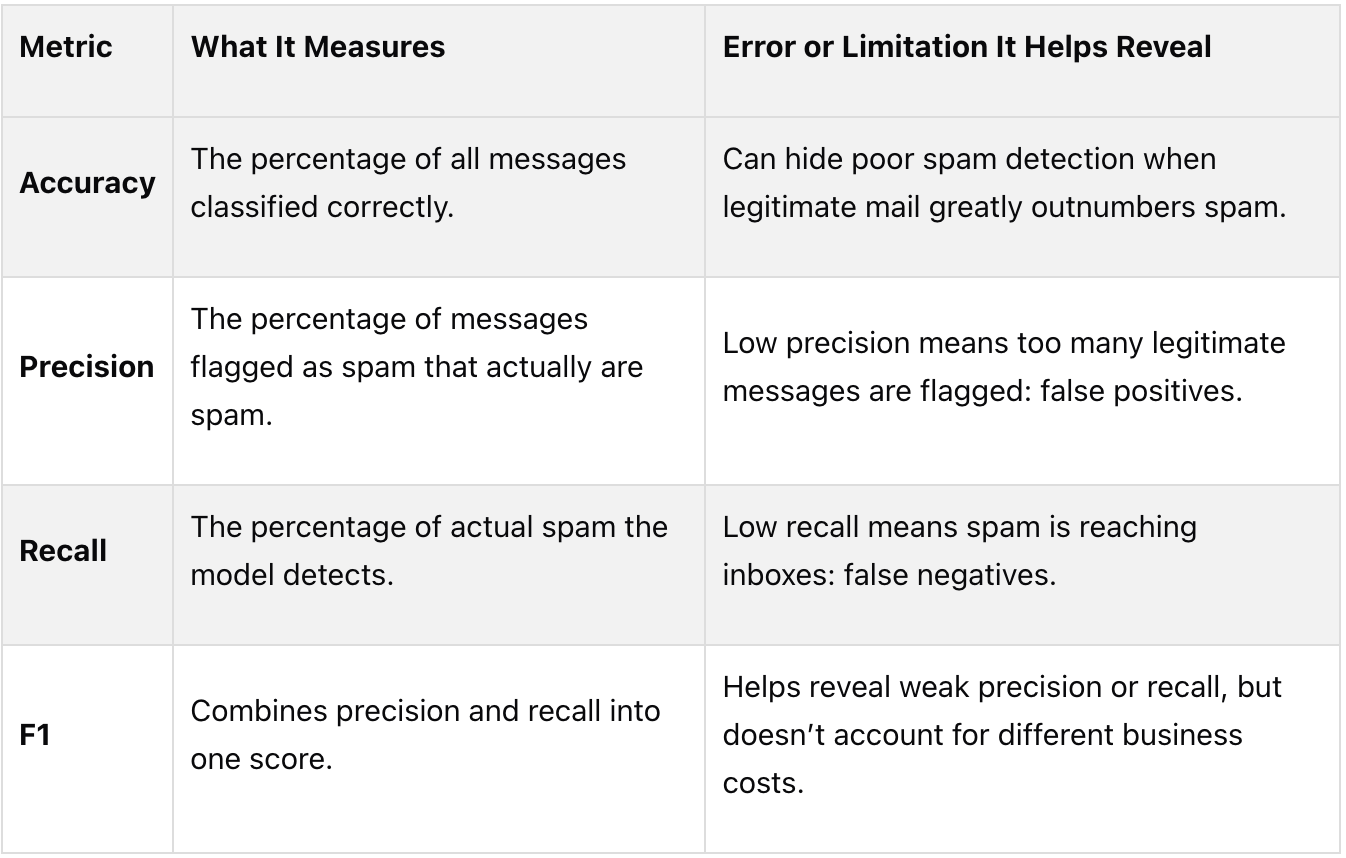
With these scores in hand, check whether the model is learning the right patterns.
Check for Overfitting and Difficult Cases
A large gap between training and validation scores signals overfitting. Regularization adds constraints that keep the model from leaning too heavily on specific details in the training data.
Keep data leakage out of evaluation. Training data must not contain future information that wouldn’t be available at prediction time. Messages from the same account must not appear in both training and evaluation sets.
Also check for label noise - incorrectly labeled data - and sampling bias, where training data doesn’t reflect the full range of messages the model will encounter. Before relying on test scores, confirm that the messages match expected use, the labels are correct, and the test set has stayed untouched.
Conclusion: Maintain the Model After Deployment
Data quality shapes what a model learns. Evaluation checks its results. Maintenance keeps it useful after deployment, when monitoring and retraining become part of the training process - not a separate step.
Monitor Performance and Plan Retraining
Track precision, recall, recent mistakes, and changes in incoming messages. Check performance by group, not just overall. Changes in language and spam tactics can cause drift, moving incoming data away from the patterns the model learned.
Assign one owner to review these signals and retrain the model on a fixed schedule. Before each release, correct labels, prepare updated data, and evaluate the retrained model using validation data split by time and account. Continue checking for duplicates, missing data, and incorrect labels.
AI Training Checklist
Use this checklist before launch and after each retraining to keep data quality, model evaluation, and maintenance connected.
- Define the task and the costs of each error.
- Collect representative data, clean it, and verify labels.
- Protect training, validation, and test splits from leakage.
- Choose and train a model; use validation to guide tuning.
- Check for overfitting and test on unseen data.
- Assign owners for monitoring and retraining.
FAQs
How much data do I need to train an AI model?
There’s no fixed amount of data you need. It depends on your project’s complexity and the task at hand. Focus on data quality and relevance - not just volume. Engineers test repeatedly to find suitable datasets and ways to represent the data.
Follow data minimization principles: collect only what you need for the specific purpose the user has approved.
Can I train an AI model without coding?
Yes, you can train AI models without writing code. Easy-to-use platforms and specialized tools help you handle data, train models, and deploy them, even if you’re just getting started. You can try tasks like sound or image recognition without programming skills.
Professional roles often call for Python and machine learning framework expertise. But you don’t need those skills to start experimenting with no-code tools.
How do I know when my model needs retraining?
Retrain your model when its performance changes or drops. Check it on a regular schedule to make sure it stays accurate and effective. Set a schedule for model updates, too, so it keeps up with changing data patterns over time.
Looking to scale more efficiently? Connect with iDelsoft.com! We specialize in developing software and AI products, while helping startups and U.S. businesses hire top remote technical talent — at 70% less than the cost of a full-time U.S. hire. Schedule a call to learn more!
11.11.2026
Keep reading
